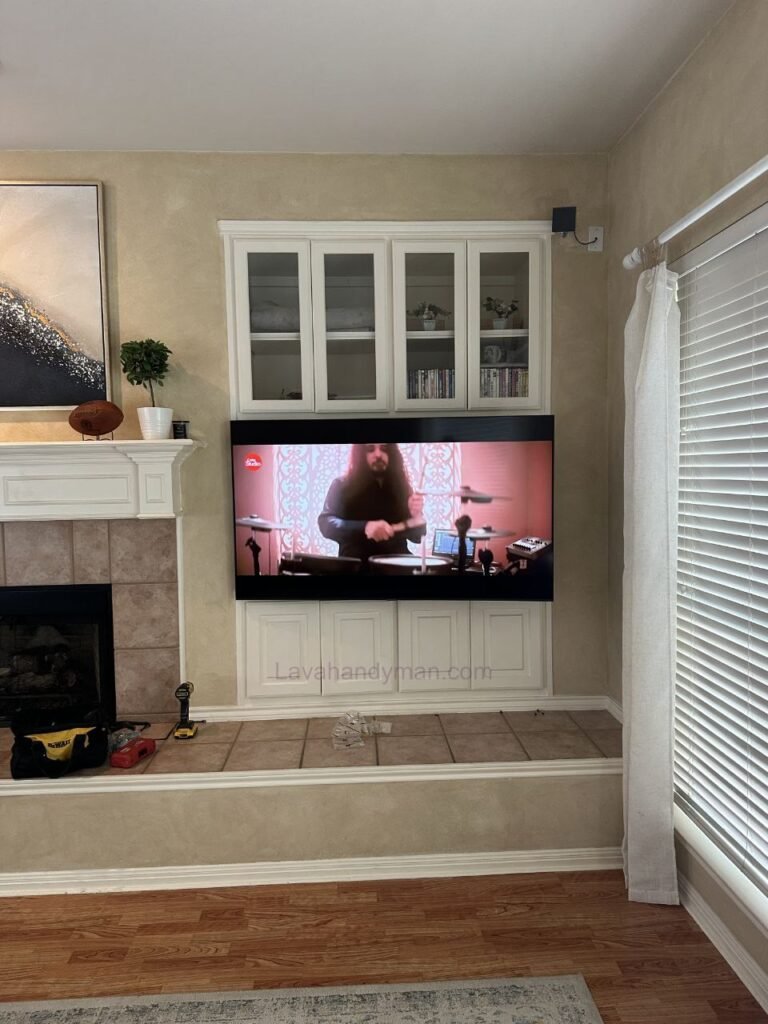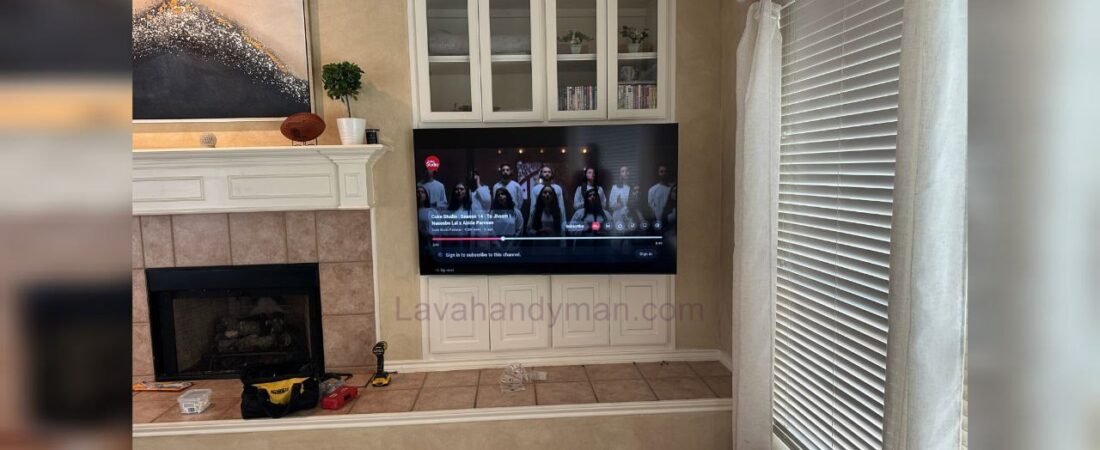
Comprehensive Guide to Installing a TV Inside a Cabinet
Installing a television inside a cabinet has become one of the most popular modern interior design solutions. With the rise of ultra-thin smart TVs from brands such as Samsung, LG, and Sony, integrating TVs seamlessly into furniture and cabinetry is now easier than ever.
Today, many homeowners prefer to install their TV in a way that not only functions well but also enhances the overall aesthetics of their living space. Installing a TV inside a cabinet is an ideal solution that combines practicality with modern design.
In this comprehensive article, we will cover the advantages, disadvantages, technical considerations, installation steps, safety tips, standards, and cost factors related to installing a TV inside a cabinet.
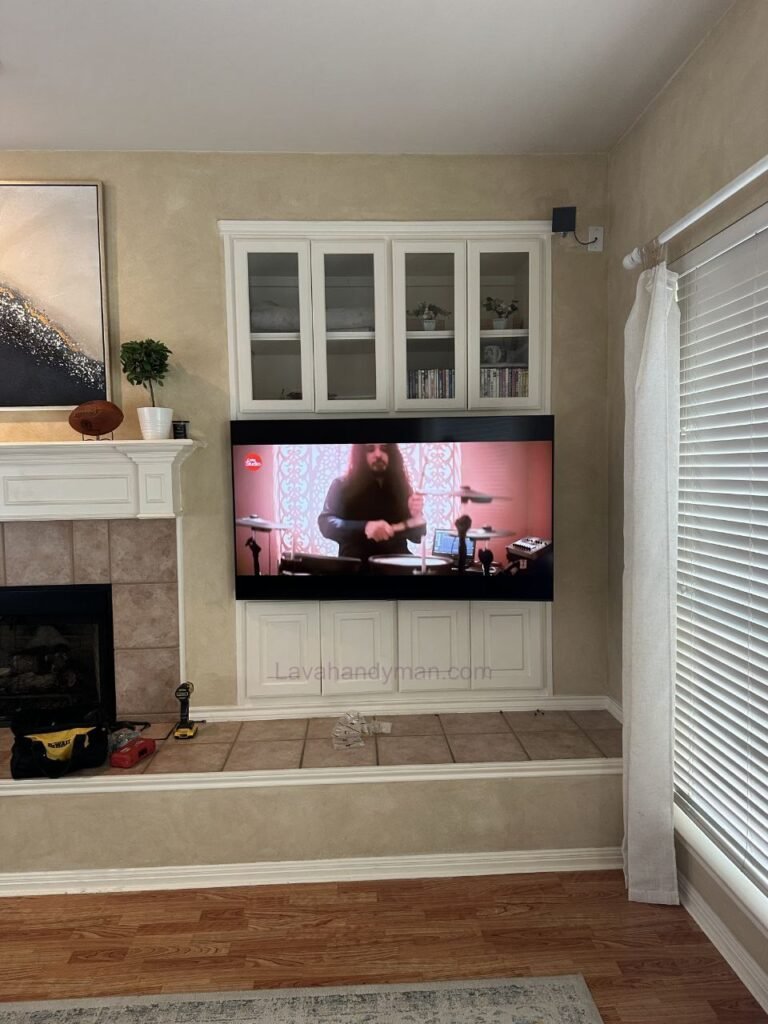
Why Installing a TV Inside a Cabinet Is a Smart Choice
Modern interior design emphasizes simplicity, organization, and efficient use of space. Especially in apartments with limited square footage, every bit of space matters.
The main benefits of installing a TV inside a cabinet include:
- Better space utilization
- Hidden cables and wiring
- A cleaner, more organized appearance
- Increased protection for the TV
- Full coordination with interior décor
When designed properly, the television becomes part of the architectural structure rather than a separate visual element.
Types of TV Installation Inside Cabinets
1. Built-In Wall Box Installation
In this method, a recessed wall box or frame is constructed, and the TV is placed inside it. This style is very common in modern living rooms.
2. Wall Mount Installation Inside a Cabinet
Here, the TV is mounted using a wall bracket inside the cabinet. Brackets may be:
- Fixed
- Tilting
- Full-motion (swivel/extendable)
The choice depends on viewing angles and furniture layout.
3. Hidden or Lift-Up TV Systems
In luxury designs, the TV is concealed inside the cabinet and rises with a motorized mechanism. This option is common in smart homes.
4. Kitchen Cabinet TV Installation
For those who enjoy watching TV while cooking or dining, smaller TVs can be installed inside upper kitchen cabinets.
Important Considerations Before Installation
1. Accurate Measurements
Measure the exact dimensions of the TV (without the stand). It is recommended to leave at least 3–5 cm (1–2 inches) of space around the TV for proper airflow.
2. Proper Ventilation
Televisions generate heat during operation. Without proper ventilation, internal components may overheat and become damaged. To ensure airflow:
- Add ventilation holes at the back of the cabinet
- Use hidden ventilation grilles if possible
- Avoid placing the TV tightly against cabinet walls
3. Structural Strength
The TV’s weight should be supported by the main wall, not just MDF panels. The wall bracket must be anchored securely into concrete or brick.
4. Access to Ports
Ensure easy access to HDMI, USB, and power ports—especially if you plan to connect gaming consoles or sound systems.
Step-by-Step Installation Process
Step 1: Proper Design Planning
The installation height should match eye level when seated. Typically, the center of the TV should be around 100–110 cm (39–43 inches) from the floor.
Step 2: Cabinet or Box Construction
The cabinet maker builds the structure based on the TV’s exact dimensions. Cable pathways should be planned at this stage.
Step 3: Wall Bracket Installation
The bracket must be secured with proper anchors and bolts into the structural wall.
Step 4: Concealed Wiring
Cables are hidden inside ducts or behind the cabinet for a clean look.
Step 5: Final Mounting and Testing
After mounting, test the TV’s picture, sound, and connections.
Standard TV Installation Height
Proper height depends on screen size and viewing distance. In general:
- The screen center should align with seated eye level
- Viewing distance for a 55-inch TV: about 2–2.5 meters (6.5–8 feet)
- Viewing distance for a 65-inch TV: about 2.5–3 meters (8–10 feet)
Correct positioning helps prevent neck strain.
Best Materials for TV Cabinets
MDF
Affordable and widely used with various finishes.
Natural Wood
Durable, elegant, and luxurious—but more expensive.
High-Gloss Panels
Modern and sleek, ideal for minimalist interiors.
Wood and Metal Combination
Perfect for industrial-style décor.
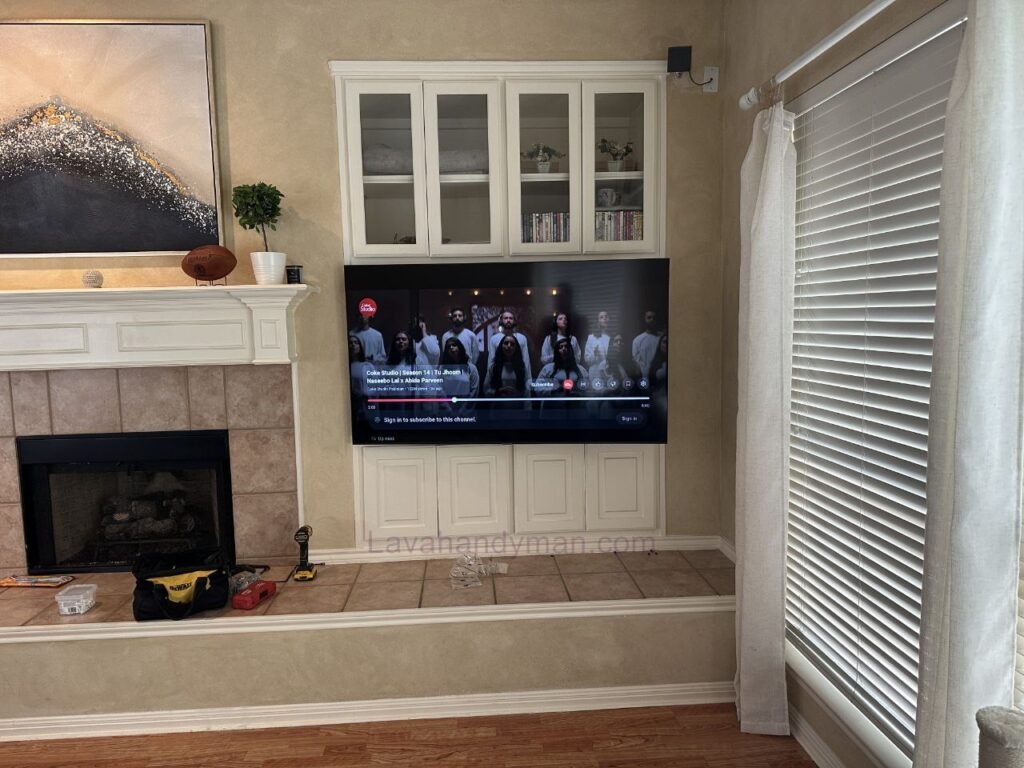
Advantages of Installing a TV Inside a Cabinet
- Clean and professional appearance
- Enhanced interior value
- Better device protection
- Reduced visual clutter
- Opportunity for integrated LED lighting
Potential Disadvantages
- Higher cost compared to simple wall mounting
- More difficult relocation
- Requires careful ventilation planning
- Limited flexibility for upgrading to larger TVs later
Common Installation Mistakes
- Ignoring ventilation requirements
- Mounting the bracket to cabinet panels instead of the structural wall
- Choosing incorrect height
- Poor cable management planning
- Using low-quality materials
Decorative Design Ideas Around the TV
To enhance the visual appeal of your cabinet TV setup:
- Install hidden LED strip lighting
- Add decorative shelves
- Use contrasting colors for the background panel
- Apply 3D wall panels behind the TV
Cost of Installing a TV Inside a Cabinet
The final cost depends on:
- Design complexity
- Materials used
- TV size
- Type of wall mount
- Labor charges
Simple designs are more affordable, while custom luxury projects can be significantly more expensive.
Complete and Optimized Step-by-Step Guide to Installing a TV Inside a Cabinet
Installing a TV inside a cabinet is one of the best ways to create a clean, modern, and professional interior design. When done correctly, it not only enhances aesthetics but also ensures the safety and longevity of your television.
In this optimized guide, we explain the step-by-step process of installing a TV inside a cabinet in a clear and practical way.
Step 1: Choose the Right Installation Location
Before starting, determine the exact installation spot. Key criteria include:
- Direct and comfortable viewing angle
- Proper distance from seating area
- Protection from direct sunlight
- Easy access to a power outlet
- A strong structural wall (brick or concrete)
Important note:
The center of the TV should align approximately with seated eye level (about 100–110 cm / 39–43 inches from the floor).
Step 2: Measure the TV Accurately
Measure the TV dimensions without its tabletop stand:
- Width
- Height
- Depth
Leave at least 3–5 cm (1–2 inches) of space around the TV for proper ventilation.
If your TV is from brands such as Samsung, LG, or Sony, check the exact specifications and weight in the manufacturer’s manual.
Step 3: Design the Cabinet or Wall Box Properly
At this stage, the cabinet must be designed precisely according to the TV dimensions.
Key design considerations:
✔ Plan cable routing pathways
✔ Include ventilation openings at the back or top
✔ Provide space for additional devices (receiver, gaming console, modem)
✔ Reinforce the back panel if necessary
Common mistake: Mounting the bracket only to MDF panels.
The wall mount must be secured to the structural wall, not just the cabinet body.
Step 4: Install the Wall Mount (Bracket)
Installing a TV Inside a Cabinet
Proper wall mount installation is one of the most critical steps.
Bracket installation process:
- Determine the standard height
- Mark drilling points precisely
- Drill using appropriate tools
- Use strong anchors and bolts
- Ensure perfect leveling
The bracket must be completely straight and firmly secured.
Step 5: Concealed and Proper Cable Management
For a clean, professional appearance:
- Run cables inside ducts or behind the cabinet
- Keep power cables separate from HDMI cables
- Use a certified surge protector
- Avoid sharply bending cables
Proper cable management improves both safety and visual appeal.
Installing a TV Inside a Cabinet
Step 6: Mount the TV on the Bracket
At this stage:
- Attach the mounting plate to the back of the TV.
- With assistance from another person, lift and secure the TV onto the bracket.
- Activate the safety locks on the mount.
Large TVs (65 inches and above) should always be mounted with two people.
Step 7: Check Ventilation and Safety Clearance
Before fully closing the cabinet, ensure:
- There is sufficient space behind the TV
- Ventilation openings are not blocked
- Heat can escape properly
If the cabinet design is fully enclosed, hidden ventilation slots must be added.
Step 8: Final Testing and Adjustments
After installation:
✔ Turn on the TV
✔ Check picture and sound quality
✔ Test HDMI and USB ports
✔ Confirm viewing angle comfort
✔ Ensure there is no wobbling or instability
If everything is stable and functioning properly, the installation is complete.
Installing a TV Inside a Cabinet
Professional Tips for Better Results
Take the weight of large TVs seriously and choose a heavy-duty wall mount.
If you may upgrade to a larger TV in the future, design with extra space in mind.
Installing LED backlighting behind the TV enhances the visual effect.
In kitchens, avoid installing the TV near steam or moisture.
Complete and Optimized Guide to Choosing the Right TV Size for Cabinet Installation
Choosing the right TV size for cabinet installation is one of the most important decisions in interior design. If the TV dimensions do not match the room size, viewing distance, and cabinet structure, you may face both aesthetic and technical issues (such as ventilation, structural support, and viewing angle problems).
In this optimized guide, we’ll cover all the essential factors for selecting the ideal TV size for cabinet installation.
Installing a TV Inside a Cabinet
Why Choosing the Right TV Size Matters
Selecting the correct size ensures:
✔ Clear and comfortable viewing without eye strain
✔ Proper neck and body posture
✔ A balanced and professional cabinet appearance
✔ Adequate ventilation for the device
✔ Flexibility for future upgrades
Televisions from brands like Samsung, LG, and Sony are available in sizes ranging from 32 to 85 inches. However, not every size is suitable for every cabinet or room layout.
Matching TV Size with Room Dimensions
Small Spaces (Under 12 m² / 130 sq ft)
- Recommended size: 32–43 inches
- Ideal viewing distance: 1.5–2 meters (5–6.5 feet)
- Suitable for: Small bedrooms or kitchens
Medium Spaces (12–25 m² / 130–270 sq ft)
- Recommended size: 43–55 inches
- Viewing distance: 2–2.5 meters (6.5–8 feet)
- Suitable for: Standard living rooms
Large Spaces (Over 25 m² / 270+ sq ft)
- Recommended size: 55–75 inches
- Viewing distance: 2.5–3.5 meters (8–11.5 feet)
- Suitable for: Large living rooms
📌 In most modern homes, a 50–55 inch TV provides the best balance.
Viewing Distance Formula
A simple rule of thumb:
Viewing Distance (in meters) × 25 ≈ Recommended TV Size (in inches)
Example:
If your viewing distance is 2 meters:
2 × 25 = approximately 50 inches
In this case, a 50 or 55-inch TV would be a suitable choice.
Important Cabinet Design Considerations Based on TV Size
1️⃣ Leave Space for Ventilation
Always leave at least 3–5 cm (1–2 inches) of space around the TV. Designing the cabinet exactly the same size as the TV is a common mistake.
2️⃣ Weight Support
Larger TVs are heavier. The cabinet and wall mount must be strong enough to support the weight safely.
3️⃣ Standard Cabinet Depth
Considering the TV thickness and cable space, a minimum depth of 10–15 cm (4–6 inches) is required.
4️⃣ Plan for Future Upgrades
If you may purchase a larger TV in the future, include a few extra centimeters in the cabinet design.
Common TV Sizes for Cabinet Installation
| TV Size | Best For | Popularity |
|---|---|---|
| 32 inches | Small spaces | Moderate |
| 43 inches | Bedrooms | High |
| 50–55 inches | Medium living rooms | Very High |
| 65 inches | Large rooms | High |
| 75 inches and above | Luxury spaces | Limited |
🎯 Most commonly used size for cabinet installation: 55 inches
Common Mistakes When Choosing TV Size
❌ Selecting a TV that is too large for the room
❌ Ignoring proper viewing distance
❌ Designing cabinets without ventilation space
❌ Overlooking the weight of large TVs
❌ Not matching the size with the interior design style
Professional Interior Design Recommendations
Always choose the TV first, then design the cabinet around it.
For modern wall cabinets, 43–55 inches creates the best balance.
Very large TVs inside small cabinet frames can look heavy and cluttered.
In minimalist spaces, medium-sized TVs appear more proportional.
Final Conclusion
Installing a TV inside a cabinet is a professional and modern solution for creating a clean, stylish, and organized living space. By following essential principles—such as proper ventilation, structural support, standard height, and clean wiring—you can ensure both safety and long-term performance.
📞 Need Help?
Let us take care of the hard work while you sit back and relax.
📍 Serving: Austin, Round Rock, Cedar Park & more
📱 Call or Text: (737) 420-6992
🌐 Visit: https://lavahandyman.com